
TCU MOBILE ID
TCU Mobile ID is now available in Apple Wallet and Google Wallet. Anyone with an active TCU ID number, including all enrolled students and current employees, can add their mobile ID to a compatible device. Tap your iPhone, Apple Watch, or Android device at readers across campus to use it conveniently. Once added to your digital wallet, it works just like a physical card.
Setting up your TCU Mobile ID is quick and easy. Most users can add their Mobile ID to their phone in just a few minutes. To get started, you must have an approved photo on file for your TCU ID card. If you have not yet submitted or taken a photo for your ID card, please visit the TCU ID Center in the Brown-Lupton University Union, located at 2901 Stadium Drive, Suite 2033. The office is open Monday through Friday, 8 AM to 5 PM, and no appointment is necessary.
Setup & FAQs
Select one of the options below to follow step-by-step instructions for adding your TCU Mobile ID to your device. Each page also includes detailed FAQs for that platform.
Using Your Mobile ID On and Around Campus
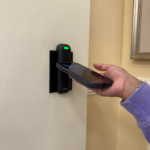 Apple iPhone and Apple Watch Users
You do not need to open Apple Wallet to use your mobile ID. If Express Mode is enabled, simply hold the top of your phone near the center of the card reader until the light changes. If access is granted, the light will turn green and the door will unlock. If Express Mode is not enabled, you will need to authenticate with Face ID, Touch ID, or your passcode each time. For readers with a keypad, hold the top of your phone near the keypad and tap.
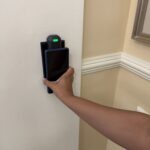 Android Users
You do not need to open Google Wallet, but your phone screen must be awake. Hold the back of your phone flat against the card reader and wait for the light to change. If access is granted, the light will turn green and the door will unlock. For readers with a keypad, hold the back of your phone near the keypad and tap.
- All Door Access
- Residence halls, Academic Buildings, Classrooms, the Rec Center and all other tap enabled doors on campus
- Athletic Events “Tickets” to enter games
- Concessions at sporting events
- Printers (Student Printing Only)
- TCU Bookstore
- Post Office
- Dining
- Market Square and Gutierrez East Dining Halls
- On -Campus Retail
- Chick-fil-a
- Bistro Burnett
- Shake Smart
- Starbucks
- King Family Commons (BLUU 2)
- KinderCafe
- The Shoppe at Wright (Amazon Just Walk Out Store)
- A La Carte (Bass Building)
Once your TCU Mobile ID Card is activated on your iPhone, Apple Watch or compatible Android phone, tap the device to any reader. (Note: Currently, these balances are not visible directly on your TCU Mobile ID using an Android device, but can be viewed on the GET mobile App.)
For now, both the physical ID and the Mobile ID will continue to work. However, TCU is moving toward a mobile-first approach for campus credentials, and the TCU Mobile ID will become the primary form of identification. We encourage you to begin using your mobile credential as soon as possible. The university plans to complete the transition to Mobile ID as the main credential by Fall 2026.
We understand that some individuals may still need a physical card. Requests for exceptions will be reviewed on a case-by-case basis. Please contact the ID Center for more information.
If you are locked out of your residence hall, you can use a friend’s phone to call the RA on duty. If you cannot get a hold of the RA on Duty, contact TCU PD by calling 817-257-7777. If you do not have access to anyone’s phone, locate the nearest blue light emergency phone, and that will connect you to TCU PD.
Yes. The TCU Mobile ID is stored on your device.
Anyone with an active TCU ID, including all faculty, staff, and students, is eligible as long as they meet all device and software requirements.
There is no cost to use your TCU Mobile ID.
TCU is moving to a mobile-first approach for campus credentials, and TCU Mobile ID will become the primary credential issued. Your physical ID card will remain active through March 31, after that, you need to use the TCU Mobile ID.
We understand that some individuals may still need a physical card, and exemptions will be reviewed on a case-by-case basis. Please contact the ID Center for more information.
Review Setup iPhone and Apple Watch Users OR Setup for Google Wallet Users
Contact the ID Center by email at idcenter@tcu.edu, by phone at 817-257-7856, or in person on the second floor of the Brown-Lupton University Union, Monday-Friday from 8 am to 5 pm.